Start a 14-day trial
Stand-ups & reports

Know what happened without calling a meeting

Each person writes a short stand-up. The manager sees who has posted, who has not and who needs a hand, and can look at the team dashboard, the reports and the activity log for the rest.

Daily stand-ups

Yesterday, today, blockers

Each person posts three things: what they did yesterday, what they will do today, and what is blocking them. Hours, mood and workload are optional extras.

  • The team board counts who has posted and who is missing for the day
  • Needs a hand pulls up the people who are blocked, flagged or overloaded
  • A weekly view shows the week’s updates together
  • A share link lets someone without an account read one day’s stand-up; the link expires and can be revoked

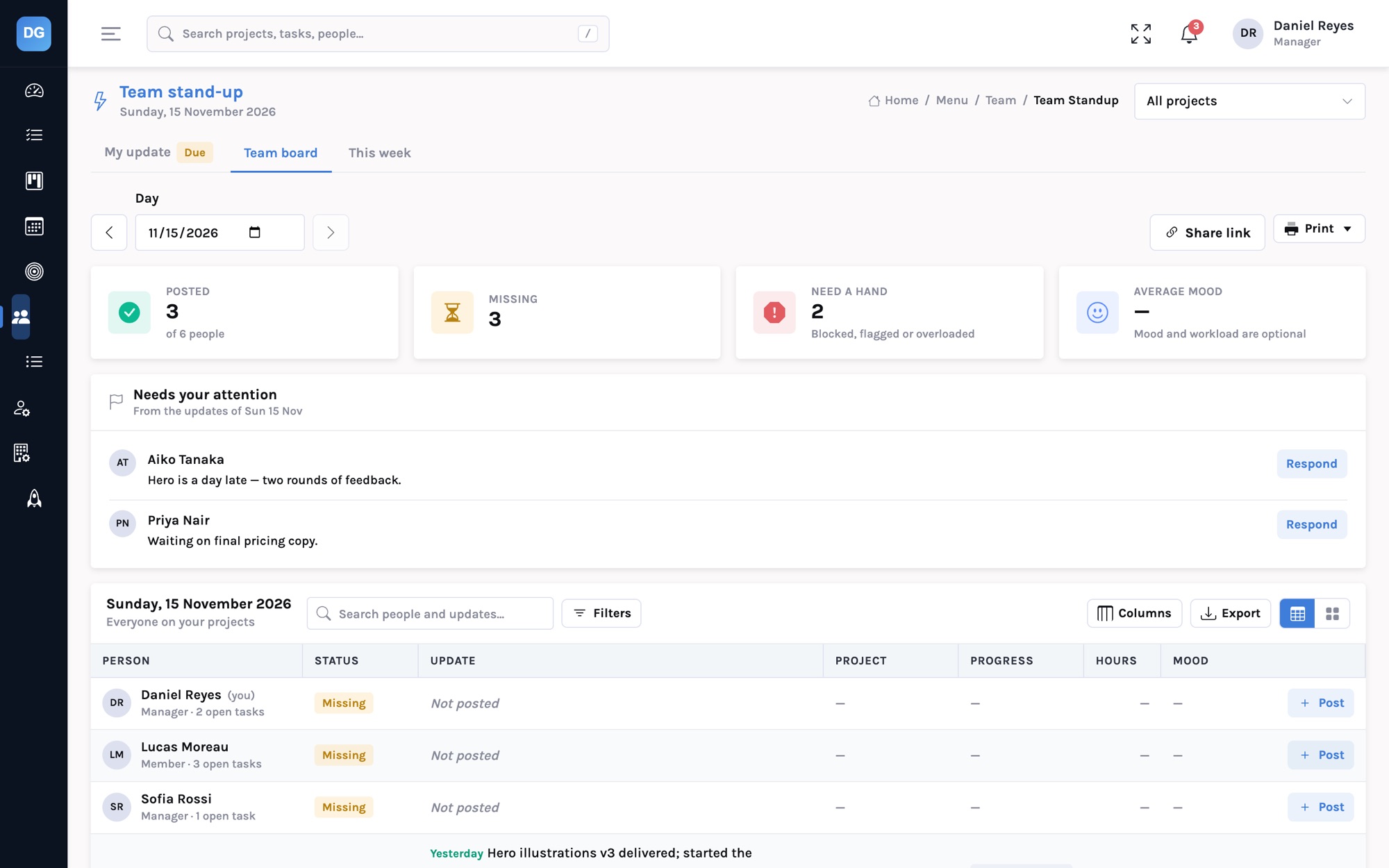
In the demo, three of six people have posted for 15 November and two of them mention a blocker.
app.delivergoals.com · Team stand-up
Team stand-up board for Sunday, 15 November 2026: Posted 3 of 6 people, Missing 3, Need a hand 2 (blocked, flagged or overloaded), average mood blank because mood and workload are optional. A Needs your attention panel lists Aiko Tanaka (Hero is a day late, two rounds of feedback) and Priya Nair (Waiting on final pricing copy), each with a Respond button; a table below lists everyone with Missing or posted status; Share link and export controls at the top.
The manager’s stand-up board for one day: who has posted, who has not, and the two people whose updates mention a blocker, pulled to the top.
Team dashboard

The team’s open work on one page

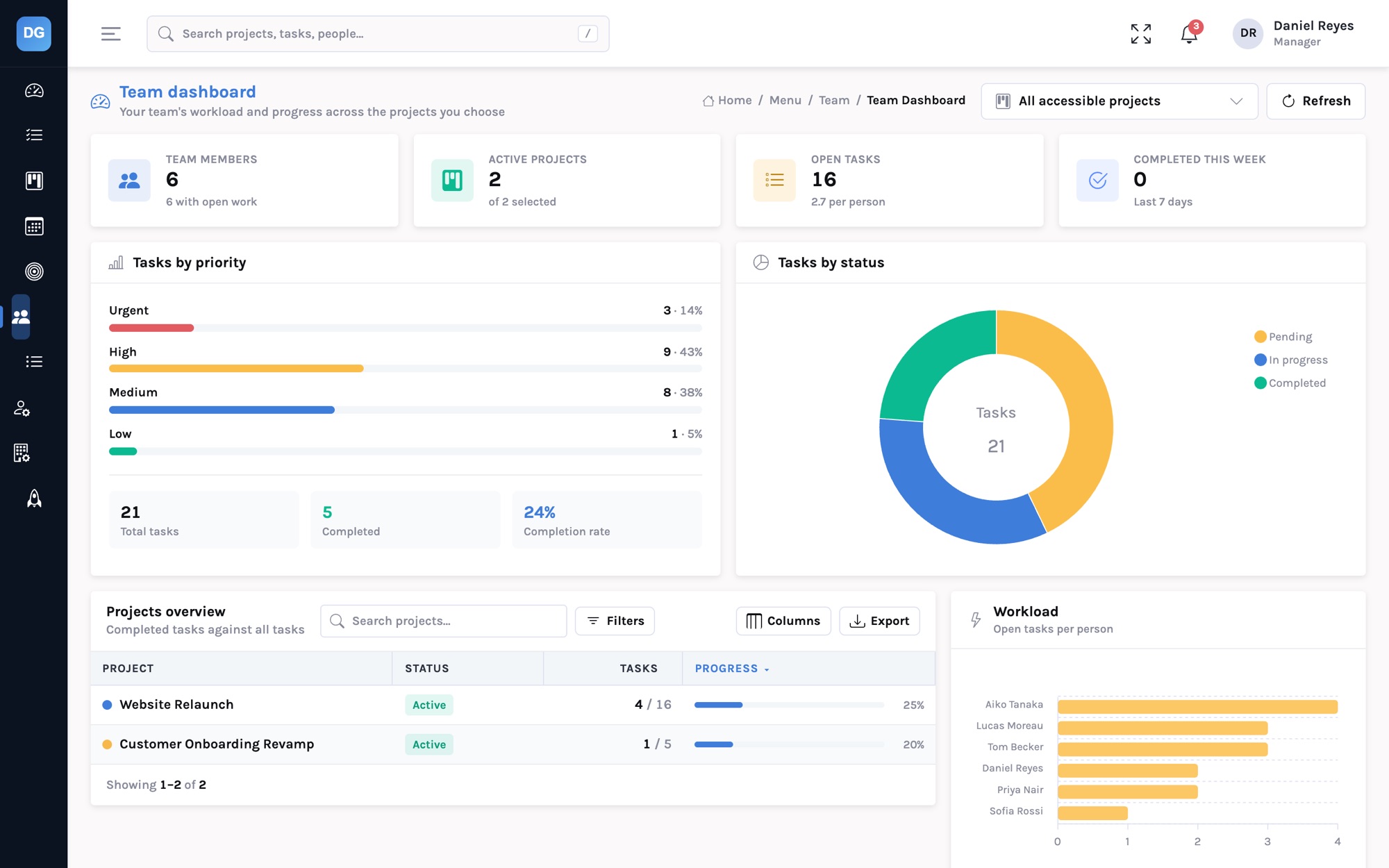
The team dashboard covers the projects you choose: how many people have open work, open tasks by priority and by status, each project’s progress, and open tasks per person.

It counts open tasks per person. For hours against capacity, week by week, see Workload & portfolio.
app.delivergoals.com · Team dashboard
Team dashboard for a manager across all accessible projects: 6 team members, 2 active projects, 16 open tasks (2.7 per person), 0 completed this week; tasks by priority (Urgent 3, High 9, Medium 8, Low 1); a tasks-by-status ring for 21 tasks (pending, in progress, completed); a projects overview with Website Relaunch 4/16 (25%) and Customer Onboarding Revamp 1/5 (20%); and a workload chart of open tasks per person from Aiko Tanaka with 4 to Sofia Rossi with 1.
The manager’s view across projects: open work by priority and status, each project’s progress, and open tasks per person.
Reports & analytics

Completion, throughput and overdue work

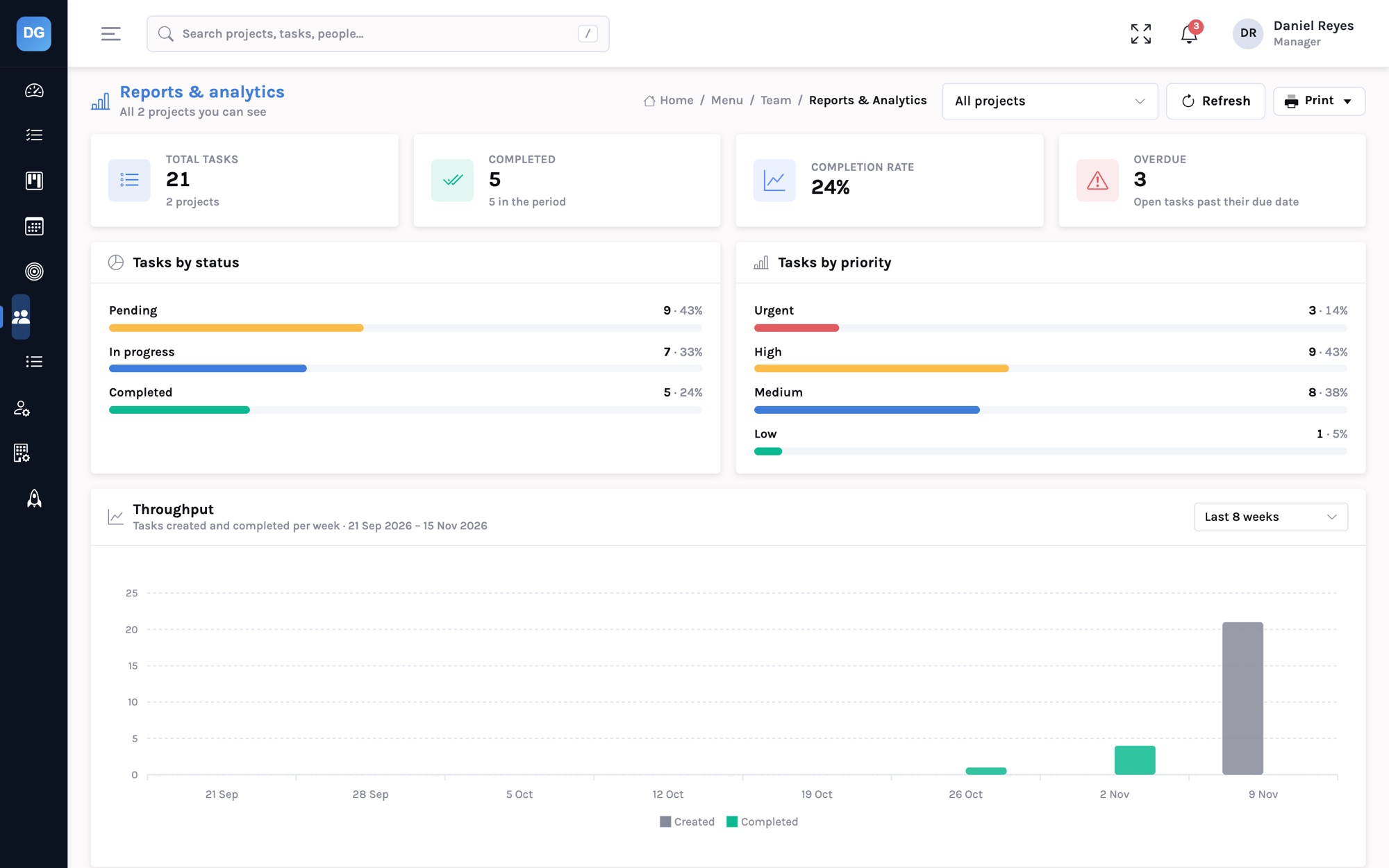
Reports show total and completed tasks, the completion rate, open tasks past their due date, tasks by status and priority, a per-project overview, and throughput: tasks created and completed per week.
app.delivergoals.com · Reports & analytics
Reports and analytics across 2 projects: 21 total tasks, 5 completed, a 24% completion rate and 3 overdue open tasks; tasks by status (Pending 9, In progress 7, Completed 5); tasks by priority (Urgent 3, High 9, Medium 8, Low 1); and a throughput chart of tasks created and completed per week for the last 8 weeks, 21 Sep to 15 Nov 2026.
Completion, overdue work and weekly throughput for the projects you can see. The demo workspace was created in one week, which is why the “created” bar is a single tall column.
Activity log

What changed, newest first

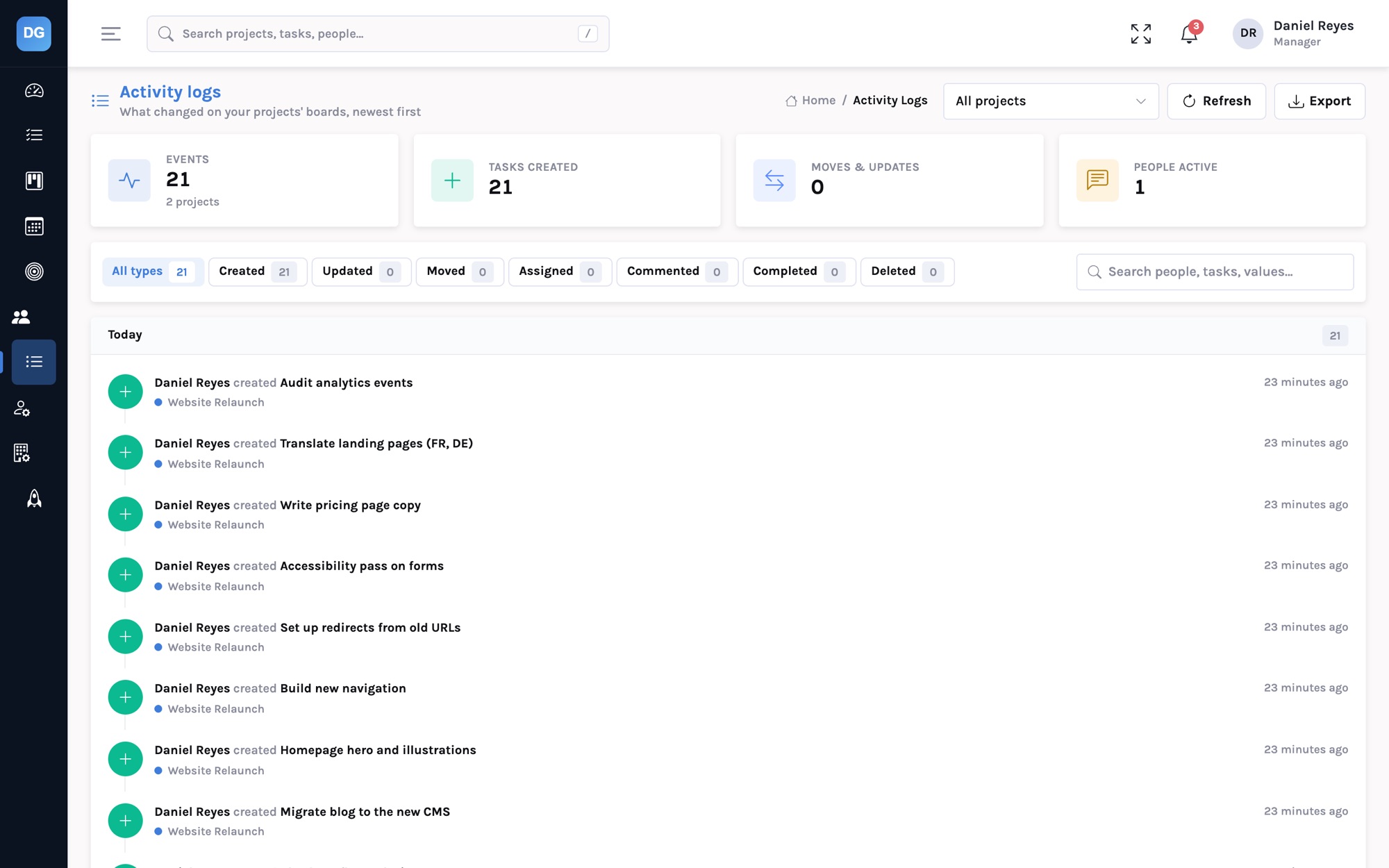
The activity log lists what happened on your projects’ boards: tasks created, updated, moved, assigned, commented on, completed and deleted. Filter by type, search by person or task, and export it.
app.delivergoals.com · Activity logs
Activity logs across all projects, newest first: 21 events in 2 projects; filters for Created, Updated, Moved, Assigned, Commented, Completed and Deleted; entries such as Daniel Reyes created Audit analytics events in Website Relaunch, 23 minutes ago; a search box and an Export button.
Who did what on your boards, filterable by type of change and exportable. In the freshly seeded demo every entry is a “created” event.
Your own dashboard

What a member sees first

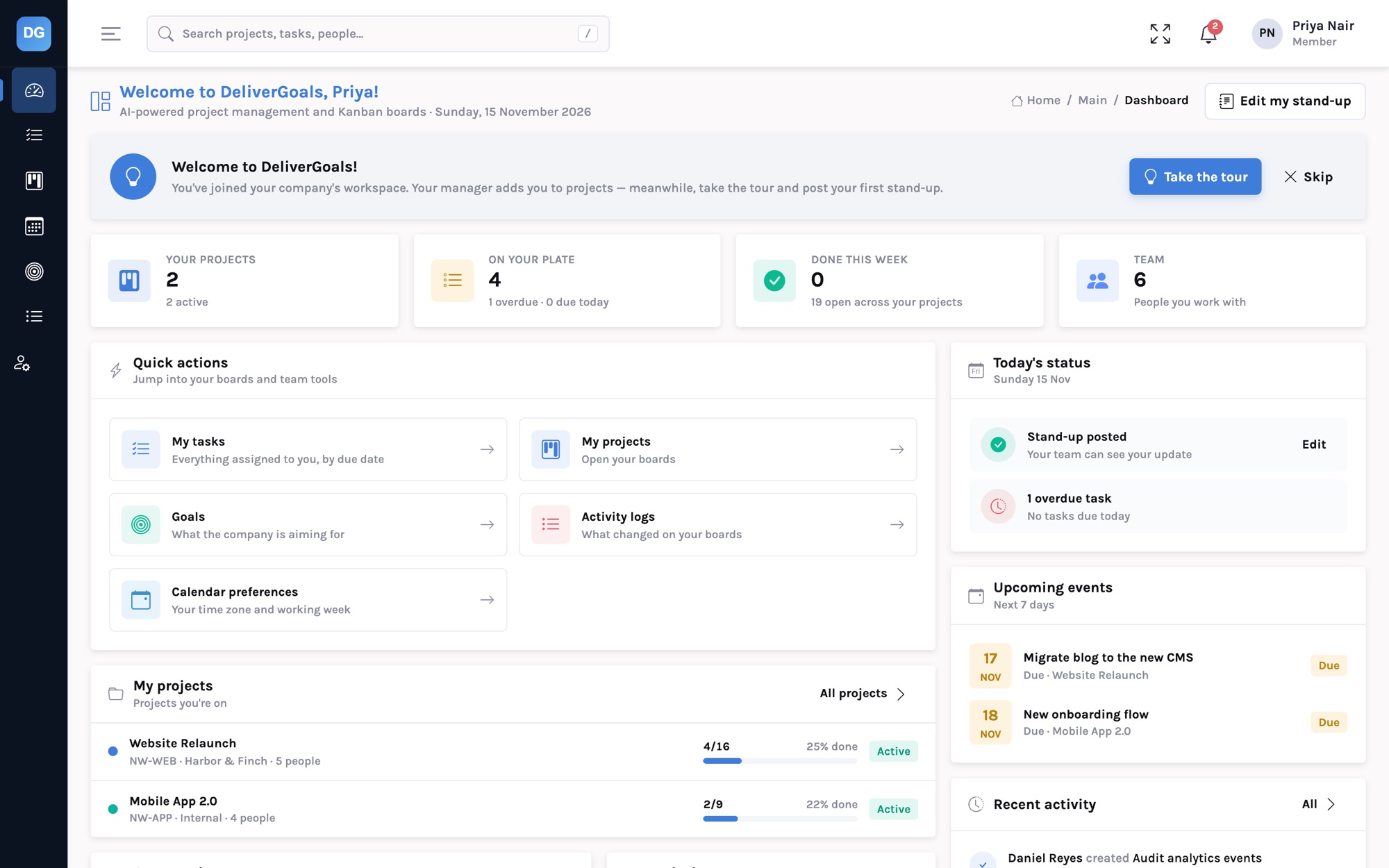
After signing in, each person gets a home dashboard: their projects, how much is on their plate, whether today’s stand-up is posted, and what is due in the next seven days.
app.delivergoals.com · Dashboard
Member dashboard for Priya Nair on Sunday, 15 November 2026: tiles for Your projects 2, On your plate 4, Done this week 0 and Team 6; quick actions to My tasks, My projects, Goals, Activity logs and Calendar preferences; Today’s status showing Stand-up posted; upcoming events for the next 7 days; and My projects listing Website Relaunch (4/16, 25% done) and Mobile App 2.0 (2/9, 22% done).
What a member sees after signing in: their projects, what is on their plate, whether today’s stand-up is posted, and what is due in the next seven days.
How it works

A day of stand-ups

A day of stand-ups 1Each person postsYesterday, today,blockers; optionalhours, mood andworkload.2Team boardPosted, missing andneeds a hand, countedfor the day.3Manager respondsStarts with theupdates that need ahand and responds tothem.4ShareA read-only link tothat day for someonewithout an account.5WeekThe weekly view showshow the week went.DeliverGoals does not send email reminders; people post when they open the app.A day of stand-ups 1Each person postsYesterday, today, blockers;optional hours, mood and workload.2Team boardPosted, missing and needs a hand,counted for the day.3Manager respondsStarts with the updates that needa hand and responds to them.4ShareA read-only link to that day forsomeone without an account.5WeekThe weekly view shows how the weekwent.DeliverGoals does not send emailreminders; people post when they openthe app.
The share link shows one day’s stand-up, expires, and can be revoked.
Questions it answers

What you can find out

Each answer is on a screen you can open.

Who has not posted today?Missing on the team stand-up board
Who is blocked?Needs your attention on the team board
Who has the most open tasks?Workload on the team dashboard
How much did we finish last week?Throughput in Reports & analytics
What is overdue across my projects?The Overdue tile in reports
Who moved this task?The activity log, filtered by Moved
In practice

What teams use it for

Replace the status meeting

Read six short updates in a few minutes and spend the meeting time on the two blockers.

Keep a client informed

Send the client a share link to the day’s stand-up instead of writing a separate summary.

A Monday review

Team dashboard for load, reports for throughput and overdue work, activity log for what changed.

Where it stops. Nothing reminds people to post a stand-up: email covers task notifications and the daily digest, and Slack or Teams channels get task updates, not stand-up nudges. Hours on a stand-up are a note; real time is logged on tasks (see Time tracking). The dashboard counts open tasks; capacity in hours is on the Workload page.

Try a week of written stand-ups

Invite the team, ask for three lines a day, and see what the team board tells you by Friday. The 14-day trial covers up to 10 people.

Start a 14-day trial