Start a 14-day trial
AI planning & brief

AI that drafts and summarises, and never acts on its own

DeliverGoals uses AI in a few narrow places where it saves a manager real time: drafting a plan, summarising the day, breaking a task down. The facts are always counted by the product; the AI writes words around them, and nothing it suggests is created until a person says so.

Plan with AI

From a few sentences to a draft plan

On a new or existing project, a manager describes the work: the outcome, the steps they know of, who owns what, any fixed dates. Plan with AI drafts the board from it.

  • Columns in workflow order and up to 30 tasks, each with start and due dates from the start date you choose
  • Owners taken only from the project’s members, dependencies on earlier tasks, milestones and checklist items
  • An assumptions note saying what it guessed
  • Every row can be unticked or renamed; nothing exists until you press Create, and the plan is checked again on the server
app.delivergoals.com · Plan with AI · Draft
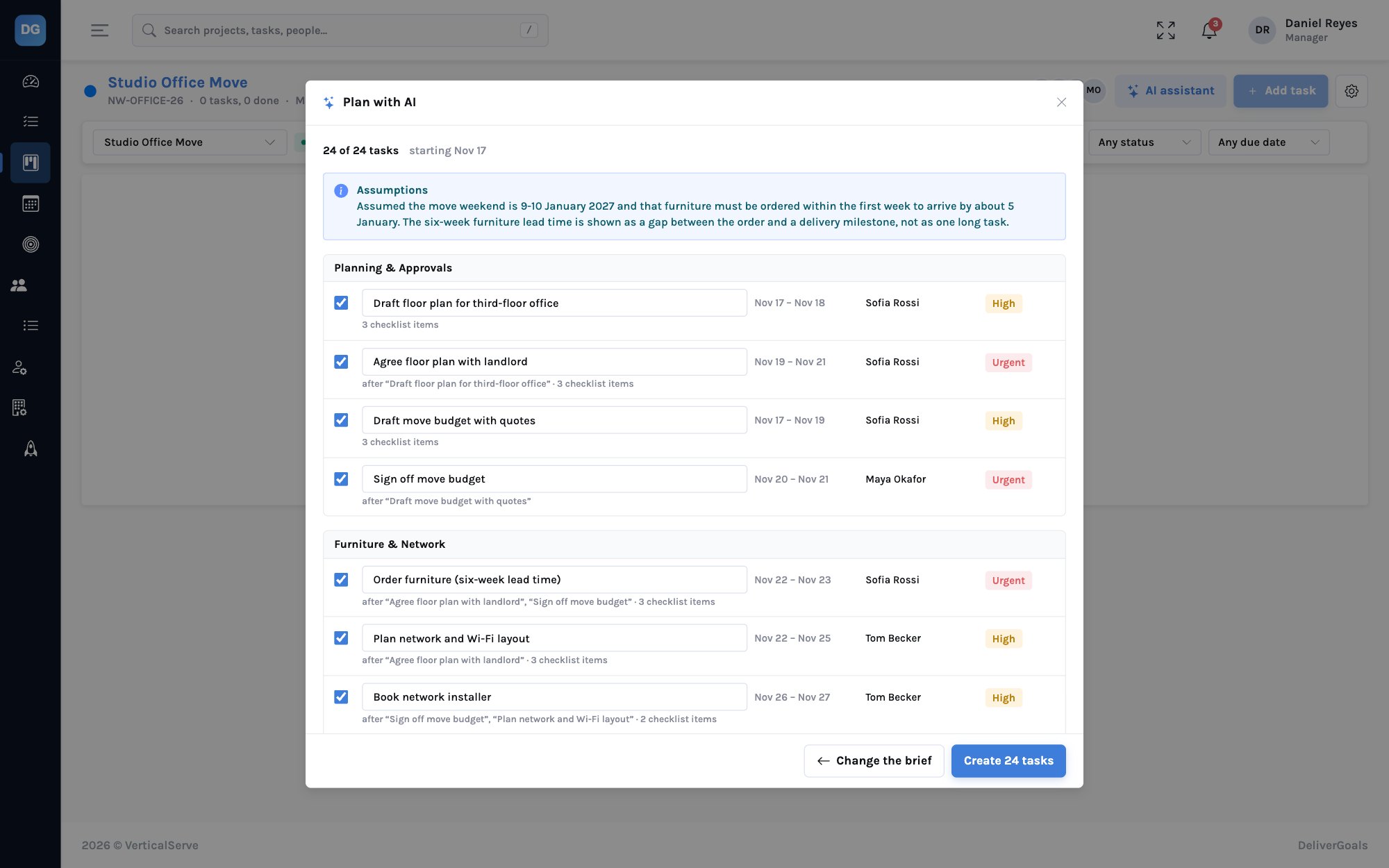
The drafted plan, 24 of 24 tasks starting 17 November: an Assumptions note (move weekend 9-10 January 2027; furniture ordered in the first week to arrive by about 5 January); a Planning & Approvals column with Draft floor plan (Sofia Rossi, High), Agree floor plan with landlord (Sofia Rossi, Urgent, after the draft), Draft move budget with quotes and Sign off move budget (Maya Okafor, Urgent); Furniture & Network with Order furniture (Sofia Rossi, Urgent), Plan network and Wi-Fi layout and Book network installer (Tom Becker, High). Each row has a checkbox, an editable title, dates, owner, priority and what it waits for; Change the brief and Create 24 tasks buttons.
The draft, for review: columns, tasks, dates, owners and dependencies. Untick or rename anything; nothing exists until you press Create.
Team brief

The manager’s day on one page

The team brief counts the day: stand-ups posted and missing, who needs a hand, what is overdue or due in the next three days, what finished since yesterday, and which goals are at risk.

A short summary at the top is written from exactly those facts and labelled as AI-written. If AI is switched off, the same summary is built by rules. It is kept for the day, so opening the page again does not call the model again.
app.delivergoals.com · Team brief
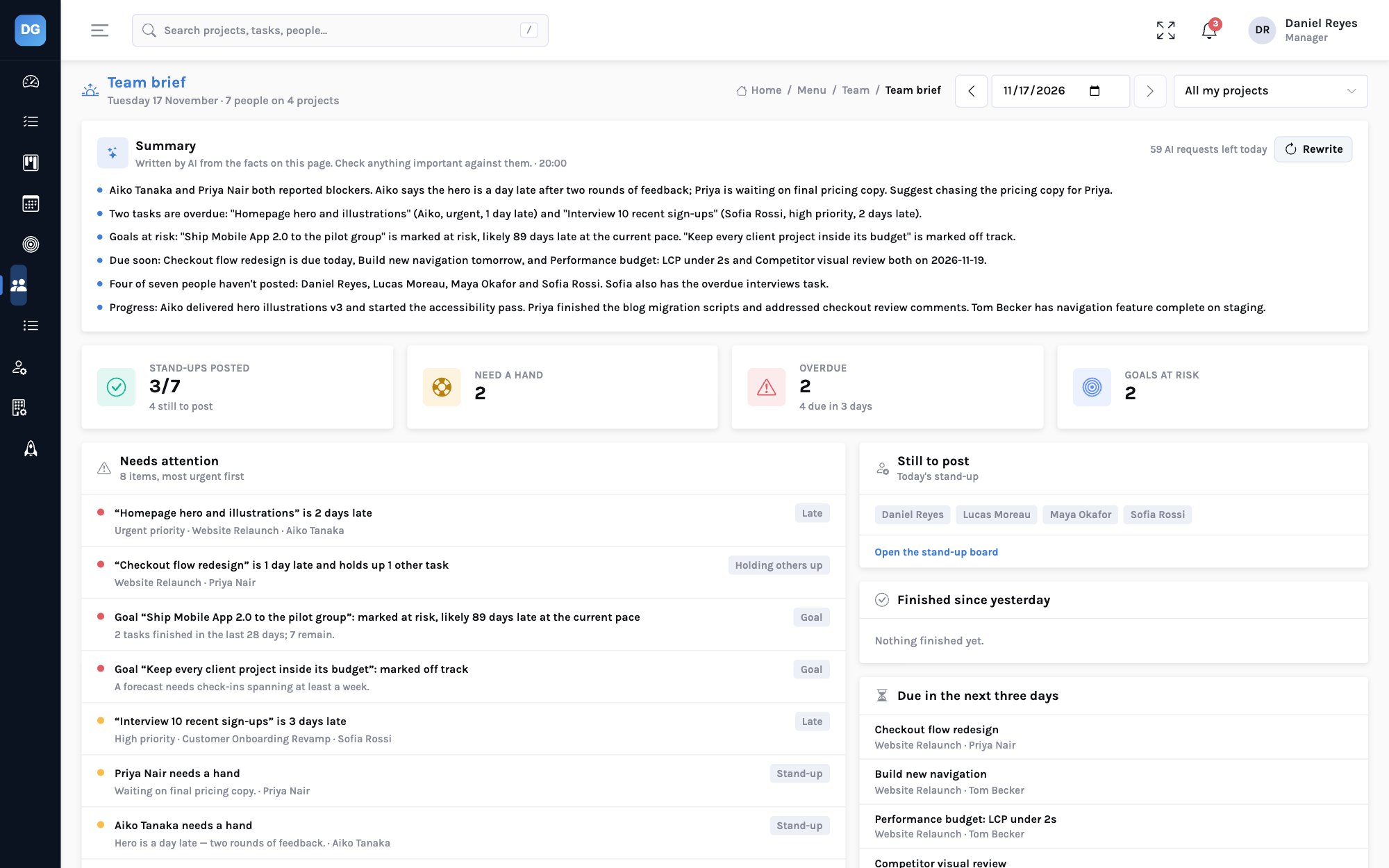
Team brief for Tuesday 17 November, 7 people on 4 projects. A Summary written by AI from the facts on the page, labelled as such, in six bullets: Aiko Tanaka and Priya Nair reported blockers; two tasks are overdue; two goals are at risk or off track; what is due soon; four of seven people have not posted; progress yesterday. Tiles: stand-ups posted 3/7, need a hand 2, overdue 2 with 4 due in 3 days, goals at risk 2. Below, Needs attention with 8 items, Still to post, Finished since yesterday and Due in the next three days.
The manager’s day on one page. The facts are counted by the product; the short summary at the top is written from those facts and says so.
Needs attention

One ranked list of what is stuck

Across every project you manage, one list, most urgent first:

  • Late work that is holding up other tasks
  • Goals heading for a miss at the current pace
  • Overdue and stalled tasks
  • Stand-up blockers and people who asked for a hand
  • Urgent work with no owner, and columns over their limit

This list is computed, not generated: it works the same with AI switched off.
app.delivergoals.com · Team brief · Needs attention
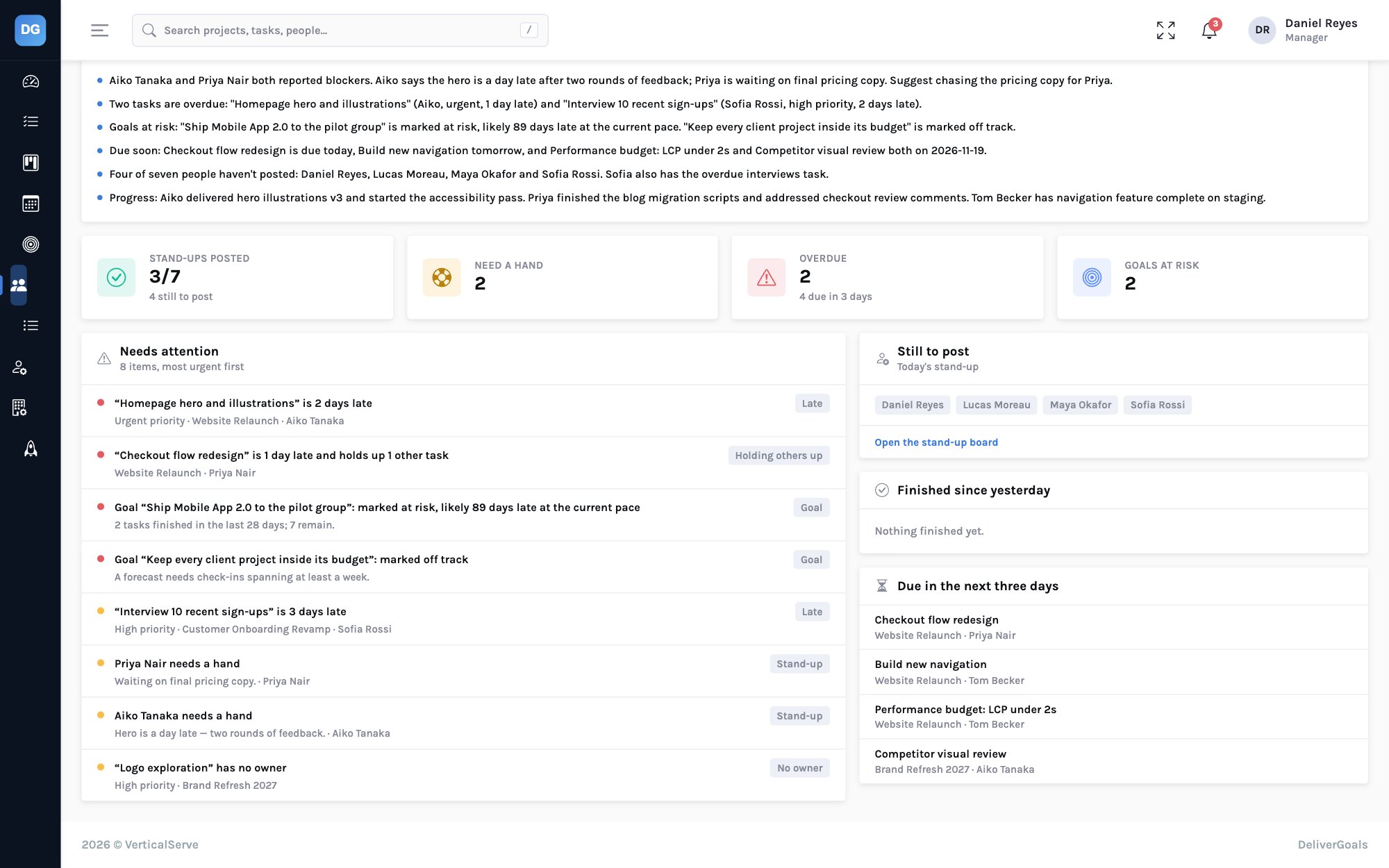
Needs attention, 8 items, most urgent first: Homepage hero and illustrations is 2 days late (Late); Checkout flow redesign is 1 day late and holds up 1 other task (Holding others up); goal Ship Mobile App 2.0 to the pilot group is at risk, likely 89 days late at the current pace (Goal); goal Keep every client project inside its budget is off track (Goal); Interview 10 recent sign-ups is 3 days late; Priya Nair and Aiko Tanaka need a hand (Stand-up); Logo exploration has no owner (No owner). Beside it: still to post, finished since yesterday, due in the next three days.
Everything that is stuck, across every project, in one ranked list: late work holding others up first, then goals heading for a miss, stand-up blockers and work with no owner.
Goal forecasts

Will this goal land on time?

A goal linked to projects is forecast from how fast their tasks have really been finishing over the last four weeks. The card says likely on time, likely N days late, stalled, or that there is not enough history yet. No AI is involved: it is arithmetic you can check.
app.delivergoals.com · Goals · Forecasts
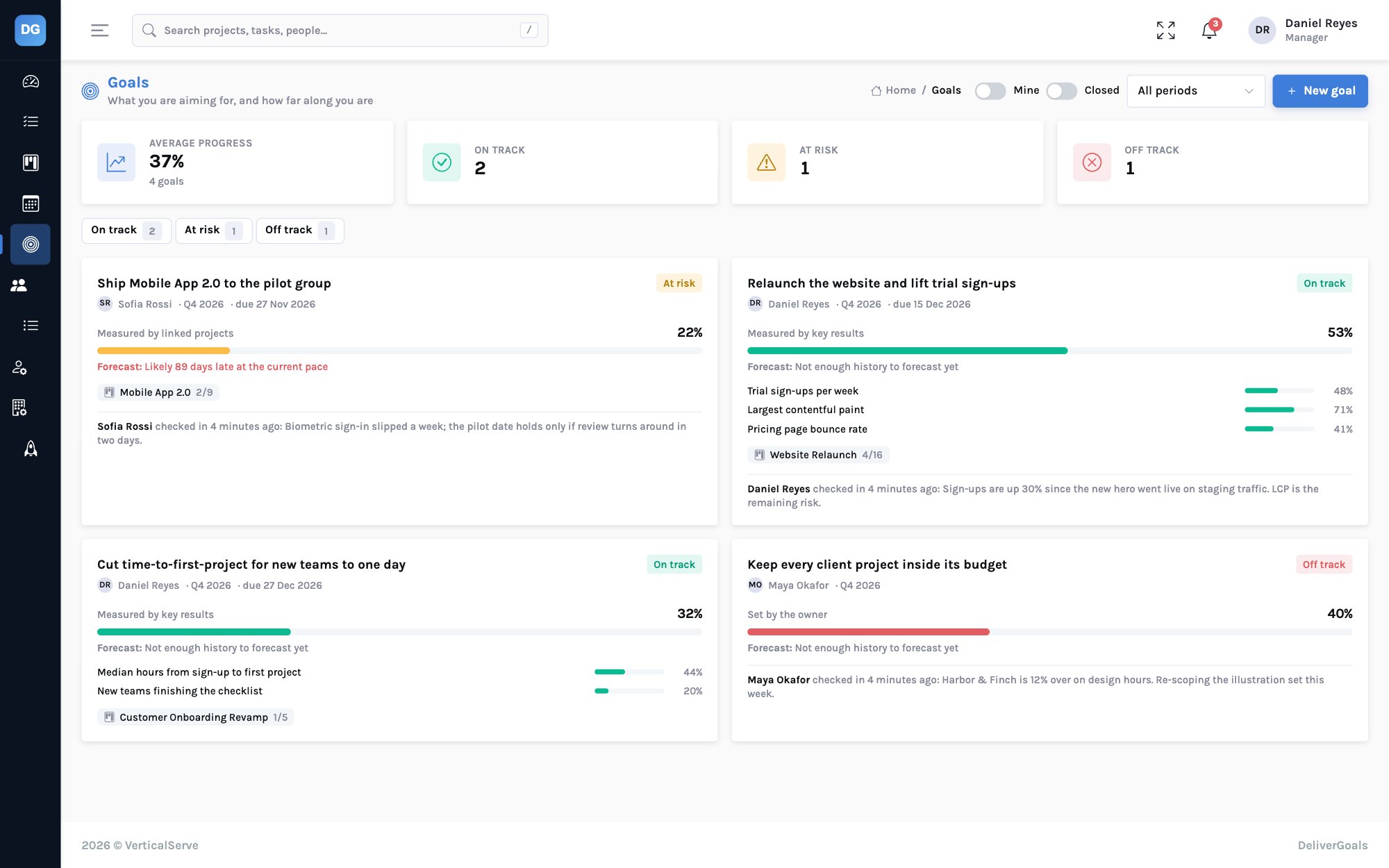
Goals page with forecasts: average progress 37% across 4 goals, 2 on track, 1 at risk, 1 off track. Ship Mobile App 2.0 to the pilot group (Sofia Rossi, due 27 Nov 2026, 22%, measured by linked projects) shows Forecast: Likely 89 days late at the current pace in red; the other three goals show Forecast: Not enough history to forecast yet. Each card shows its key results or linked project and the latest check-in.
Every goal now says whether it will land on time at the pace the work is really moving, or that there is not enough history yet to say.
Inside a project

The assistant and subtask generator

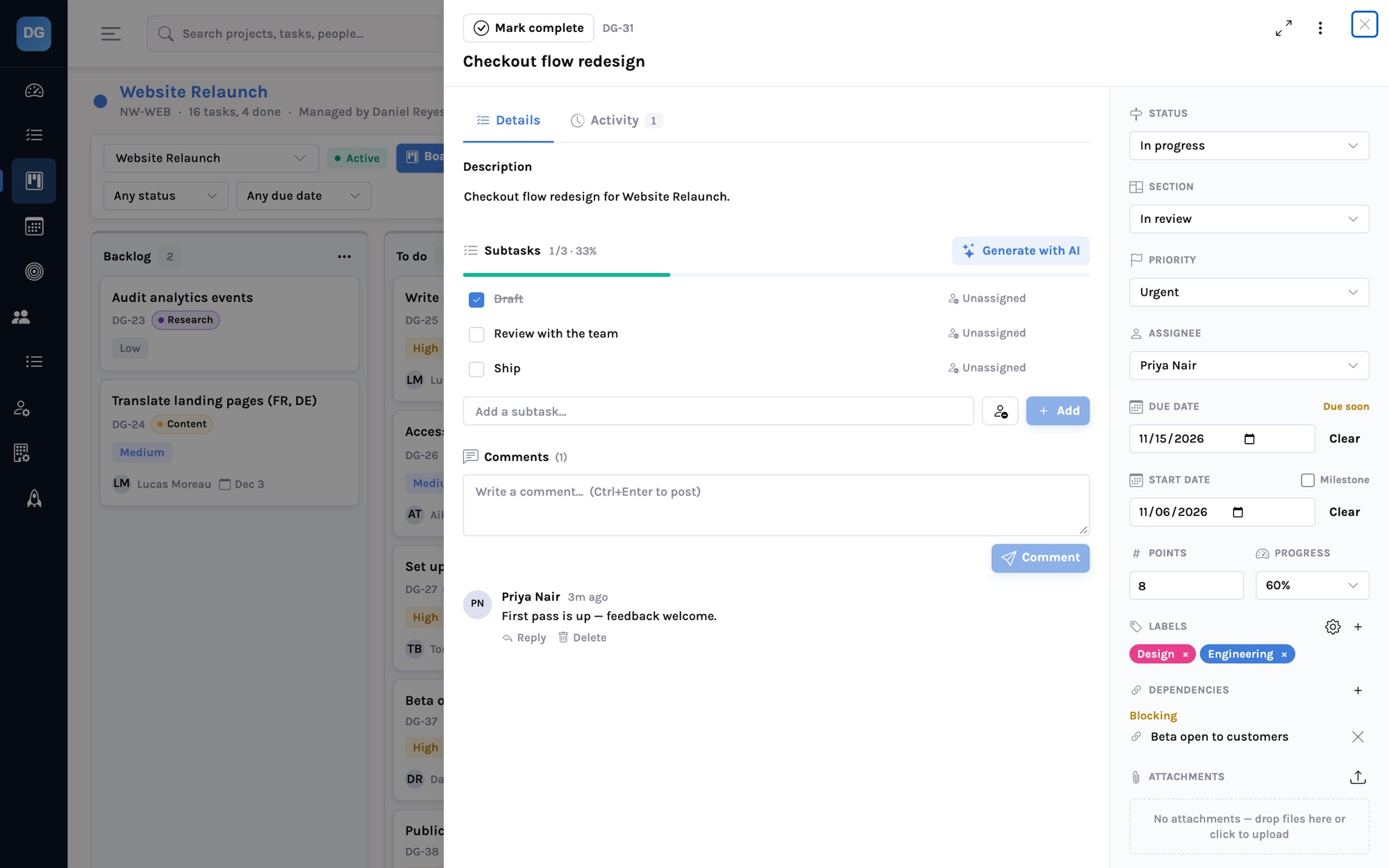
Each project also has an AI assistant that creates, updates or moves tasks from a plain-English request, or reports where the board stands; and inside a task, Generate with AI writes a checklist of subtasks. Read what they produce before the team works from it.
app.delivergoals.com · Task DG-31
Task panel for Checkout flow redesign (DG-31): a description, three subtasks with 1 of 3 done (33%) and a Generate with AI button, a comment from Priya Nair with Reply, and on the right status In progress, section In review, priority Urgent, assignee Priya Nair, due date 11/15/2026 marked Due soon, start date 11/06/2026 with a Milestone checkbox, 8 points, 60% progress, labels Design and Engineering, a dependency Blocking: Beta open to customers, and an attachments drop area.
Generate with AI sits above the subtasks of a task.
How the AI is kept in its lane

Safety, privacy and cost

ConcernWhat the product does
Prompt injectionText people wrote (stand-ups, task names) is passed to the model as fenced data under a rule never to follow it; the model has no tools in the brief or the planner
What the model seesThe planner sees the brief, the project’s name and its members’ names and roles; the brief sees the day’s facts for projects the manager can open. Never other companies, never email addresses
What comes backSummaries and the plan’s assumptions note have links, email addresses, markup and scripts stripped; task titles and descriptions lose markup and control characters; everything is shown as plain text and labelled as AI-written
Nothing unreviewedThe planner only drafts; creating is a separate request that is validated again (members only, no cycles, sane dates)
Cost and abuseA per-minute brake plus daily allowances per person and per company, counted in the database; the model is fixed by configuration, not chosen by the browser; a switch turns AI off
How it works

Facts first, words second

Facts first, words second 1Your dataStand-ups, boards andgoals for theprojects you canopen.2CountedPosted, missing,late, stalled,blocked, at risk:computed by theproduct.3RankedNeeds attention, mosturgent first. Workswith AI off.4AISummarisedA short AI summarywritten only fromthose facts, labelledas such.5You actReassign, re-date,reply to a blocker,or approve a draftedplan.If AI is switched off for the service, the counted facts and the ranked list stay, and the summary is built by rules.Facts first, words second 1Your dataStand-ups, boards and goals forthe projects you can open.2CountedPosted, missing, late, stalled,blocked, at risk: computed by theproduct.3RankedNeeds attention, most urgentfirst. Works with AI off.4AISummarisedA short AI summary written onlyfrom those facts, labelled assuch.5You actReassign, re-date, reply to ablocker, or approve a draftedplan.If AI is switched off for the service,the counted facts and the ranked liststay, and the summary is built byrules.
The planner follows the same rule: the model drafts, the server validates, you approve.
Questions it answers

What you can find out

Each answer is on a screen you can open.

What needs me this morning?The team brief and its Needs attention list
Is anything holding other work up?Items marked Holding others up, at the top
Will this goal land on time?The forecast line on each goal
Can you draft a plan for this project?Plan with AI, from the project’s settings menu
What are the steps for this task?Generate with AI in the task
Why is there no AI summary?AI is switched off or today’s allowance is used; the rules-based summary is shown instead
In practice

What teams use it for

Start a project in ten minutes

Write a paragraph, review the draft, untick what you do not need, create.

A five-minute morning

Read the summary, work down Needs attention, reply to the two people who asked for a hand.

Catch a goal before it slips

A goal that says “likely 3 weeks late” in November is a conversation to have now, not in December.

Where it stops. The AI drafts and summarises; it does not schedule, assign or change anything by itself, and nothing runs on a timer. It does not know your calendar, holidays or how big a task really is, so its dates are a first draft. Forecasts need a few weeks of finished work to say anything. The team brief is a page you open; the email digest covers each person’s own work, not the team brief.

See it on your own work

Import or create one project, write a brief, and open the team brief tomorrow morning. The 14-day trial covers up to 10 people.

Start a 14-day trial