Every team that has tried quarterly goals knows how it goes. The goals are written in week one, with care. In week three somebody updates the percentages. By week eight the list says 40% for everything and nobody believes it. The goals were fine; the measuring depended on memory.
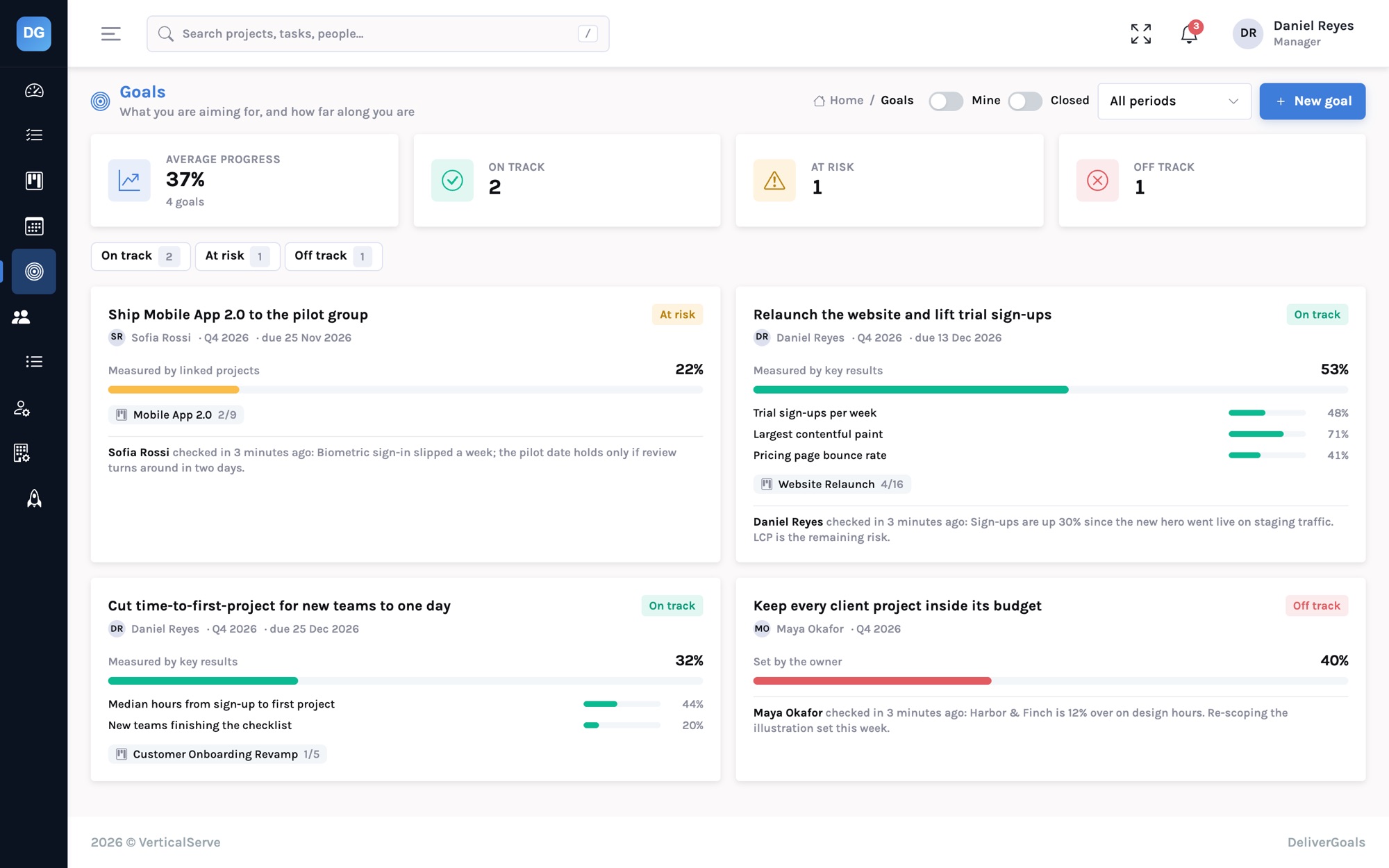
DeliverGoals offers three ways to measure a goal, and two of them do not depend on anyone remembering. This post explains each, using the four goals in the Northwind Studio demo workspace. Northwind Studio is fictional and so are its numbers; they are useful because you can check the arithmetic.
What every goal has
A goal has an owner, a period such as Q4 2026, and a target date. It can have a parent goal and child goals, so a company goal can sit above the team goals that support it. Then you choose how its progress is measured.
| Measure | Where the number comes from | Use it when |
|---|---|---|
| Key results | Each key result has a start value, a target and a current value | Success is a number you can read somewhere: sign-ups, seconds, a rate |
| Linked projects | The share of tasks done in the projects linked to the goal | Success is “the thing shipped”, and the work is already on a board |
| Set by the owner | The owner enters a percentage | Neither of the above fits, and a judgement is honest |
Key results: a start, a target and a current value
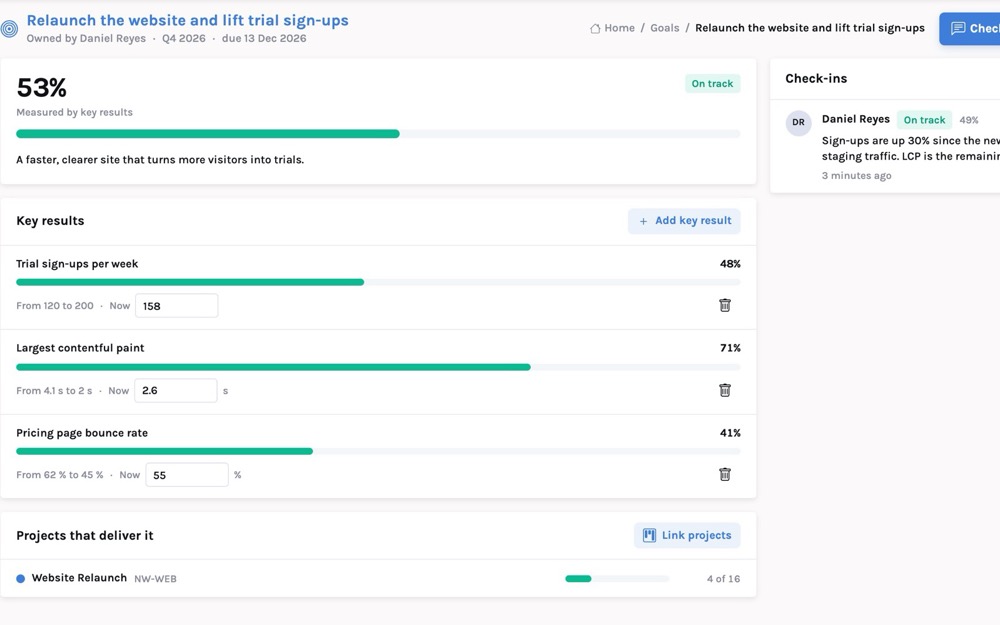
The goal “Relaunch the website and lift trial sign-ups” belongs to Daniel Reyes and is due on 13 December. Shipping the site is not the point; more trials is. So it has three key results.
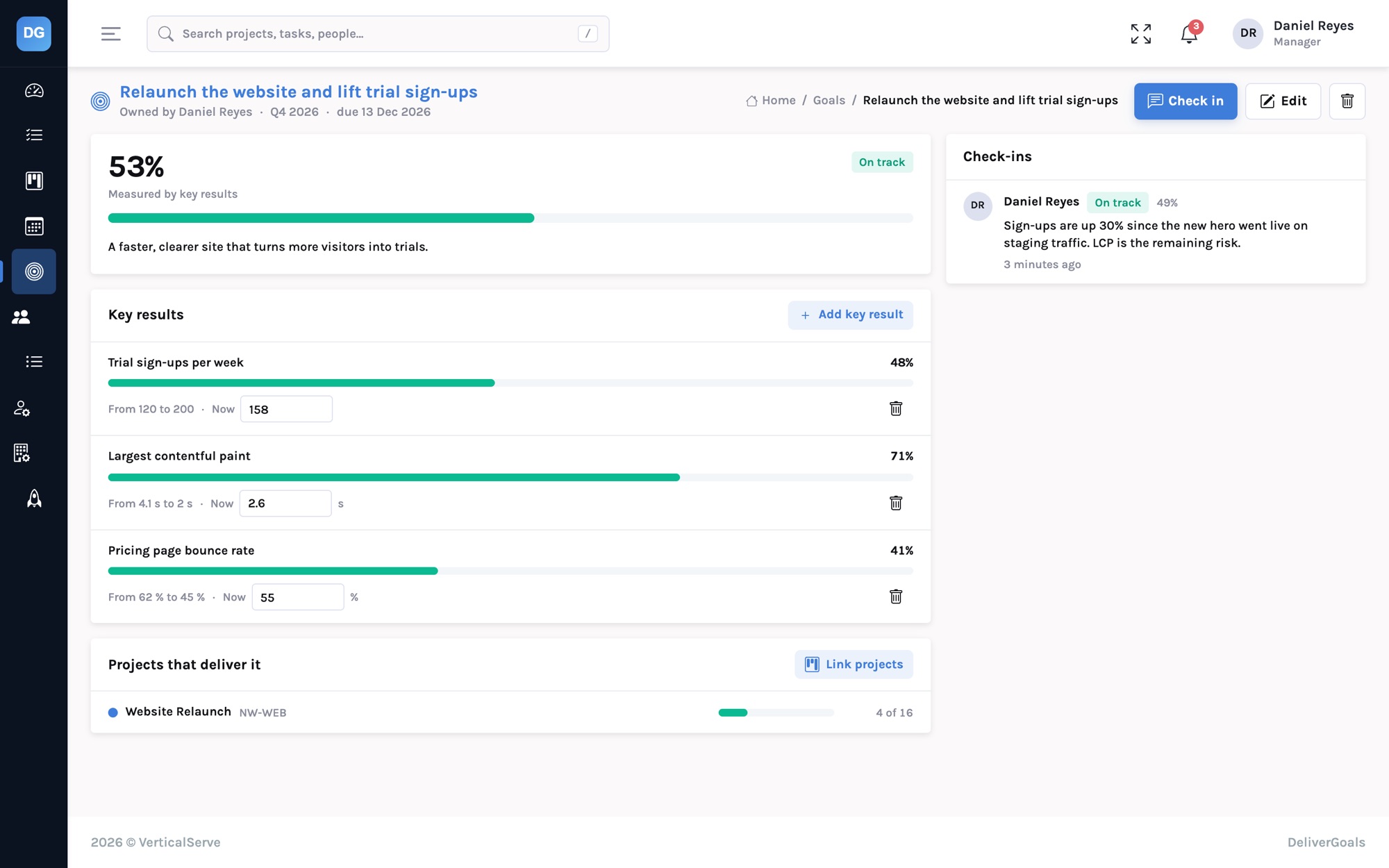
The percentage of a key result is how far the current value has travelled from the start towards the target:
| Key result | Start | Target | Now | Worked out | Shown |
|---|---|---|---|---|---|
| Trial sign-ups per week | 120 | 200 | 158 | (158 − 120) ÷ (200 − 120) = 0.475 | 48% |
| Largest contentful paint | 4.1 s | 2 s | 2.6 s | (4.1 − 2.6) ÷ (4.1 − 2) = 0.714 | 71% |
| Pricing page bounce rate | 62% | 45% | 55% | (62 − 55) ÷ (62 − 45) = 0.412 | 41% |
The average of the three is 53%, which is what the goal shows. Two of these key results count down: a faster page and a lower bounce rate are better. Because a key result has both a start and a target, the direction takes care of itself.
The current value is typed into the box by a person. DeliverGoals does not read it from your analytics. That is the one manual step, and it is a small one: reading a number off a dashboard once a week.
Writing a good key result
- Record the start honestly. A key result with no baseline cannot show progress. “From 120” matters as much as “to 200”.
- Keep to two or three. The goal’s percentage is built from all of them, and a fourth usually dilutes the ones that matter.
- Measure the result, not the activity. “Publish 10 pages” is a task list and belongs on the board.
Linked projects: progress from finished tasks
Some goals really are “ship the thing”. “Ship Mobile App 2.0 to the pilot group”, owned by Sofia Rossi, has no key results. It is linked to the project Mobile App 2.0, and its progress is the share of that project’s tasks that are done: 2 of 9, which is 22%.
Nobody enters that number. When a third task is completed on the board, the goal moves. That is the sense in which the goal measures itself.
Two cautions. Task counts treat every task as equal, so a project with one enormous task and eight small ones will read high early. And a goal measured this way can reach 100% without the outcome you wanted, if the tasks were the wrong ones. When the outcome is a number, use key results and link the project as well, as the website goal does.
Set by the owner: allowed, sparingly
“Keep every client project inside its budget”, owned by Maya Okafor, is set by the owner at 40%. DeliverGoals now tracks time on tasks, so the hours spent are in the time report, but there is no money or budget field to set them against. An honest judgement, with the hours as evidence, is better than a fake metric. Use this for one goal in five at most, and make the check-in note carry the evidence.
The check-in habit
The percentage is a measurement. The status is a judgement, and it belongs to the owner. A check-in records one of five statuses and a note:
| Status | Means |
|---|---|
| On track | At this rate we will get there by the target date |
| At risk | We might not, and here is what would have to change |
| Off track | We will not, unless the plan changes |
| Achieved | We got there |
| Dropped | We decided to stop, and say so rather than letting it fade |
Measurement and judgement can disagree, and that is the useful part. The mobile goal is at 22% and marked at risk, because Sofia knows something the task count does not: “Biometric sign-in slipped a week; the pilot date holds only if review turns around in two days.”
A check-in should take two minutes. One status, one or two sentences, once a week, on the same day. If it takes longer, the goal has too many key results or the note is trying to be a report.
What goals do not do
Key result values are entered by hand, not pulled from other systems. There are no sprints, so goals are not tied to them. A check-in sends a notification, by email too if the owner has switched that on; there is no digest of goal progress.
Choosing, in one line each
- If success is a number, write two or three key results with a start and a target.
- If success is “it shipped”, link the project and let the tasks count.
- If neither fits, let the owner set it, and say why in the check-in.
- Whatever the measure, check in weekly with a status and a sentence.
The details of each screen are on the Goals feature page.