A client asks whether the new pricing page can go live a week early. The honest answer depends on three things: how much work is left, who would do it, and what else those people are already carrying. Most project tools show the first. DeliverGoals now shows all three.
The examples are from the Northwind Studio demo workspace, a fictional studio, on Wednesday 18 November 2026. Daniel Reyes manages two of its projects, including Website Relaunch for the client Harbor & Finch.
1. Estimates on tasks
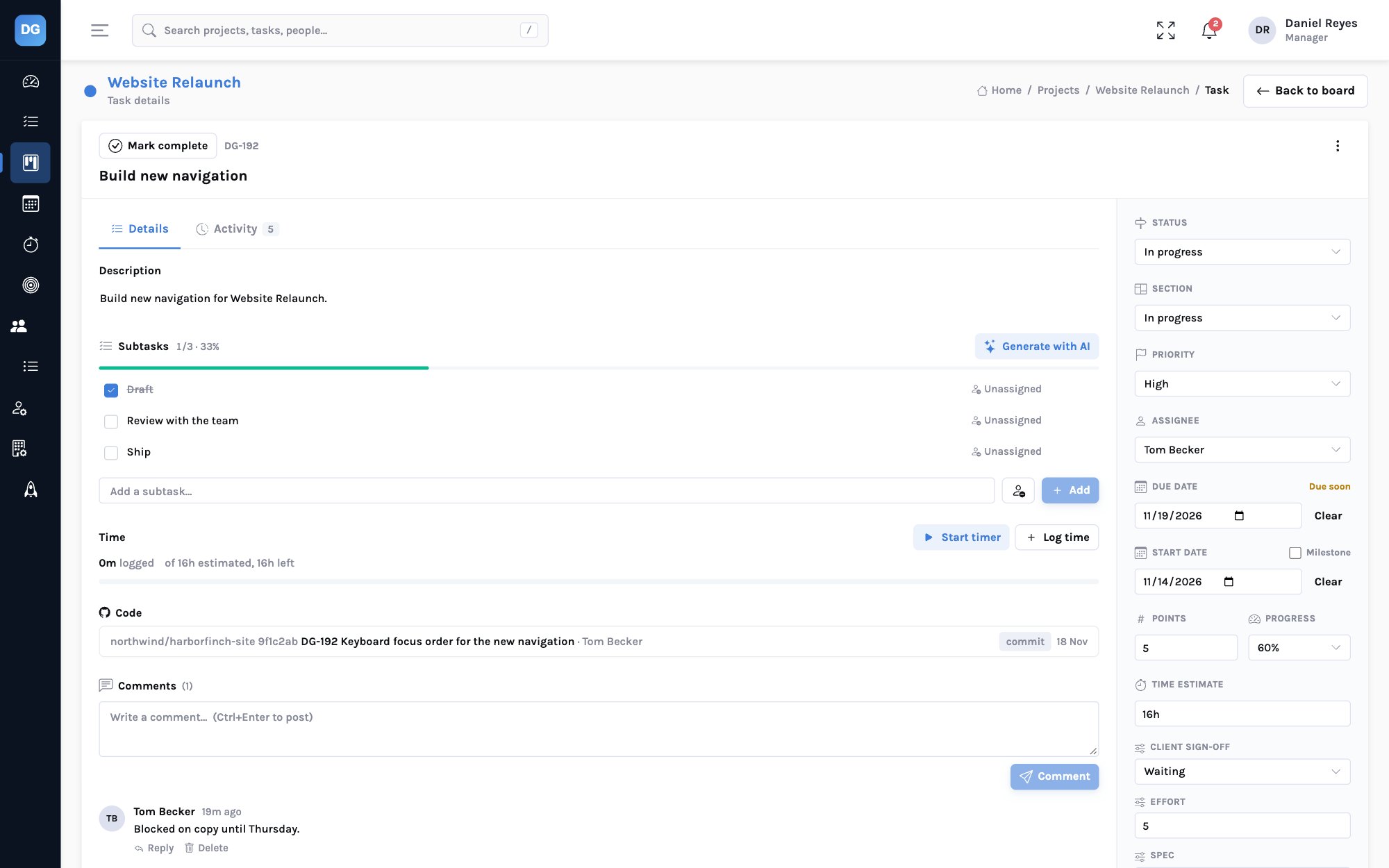
A task’s time estimate sits in the side panel of the task, typed the way people talk: 16h, 1:30, 45m. Time logged against the task is shown beside it, so the panel says “0m logged of 16h estimated, 16h left”. Points still exist for teams that use them; capacity uses hours.
2. Workload: people against their capacity
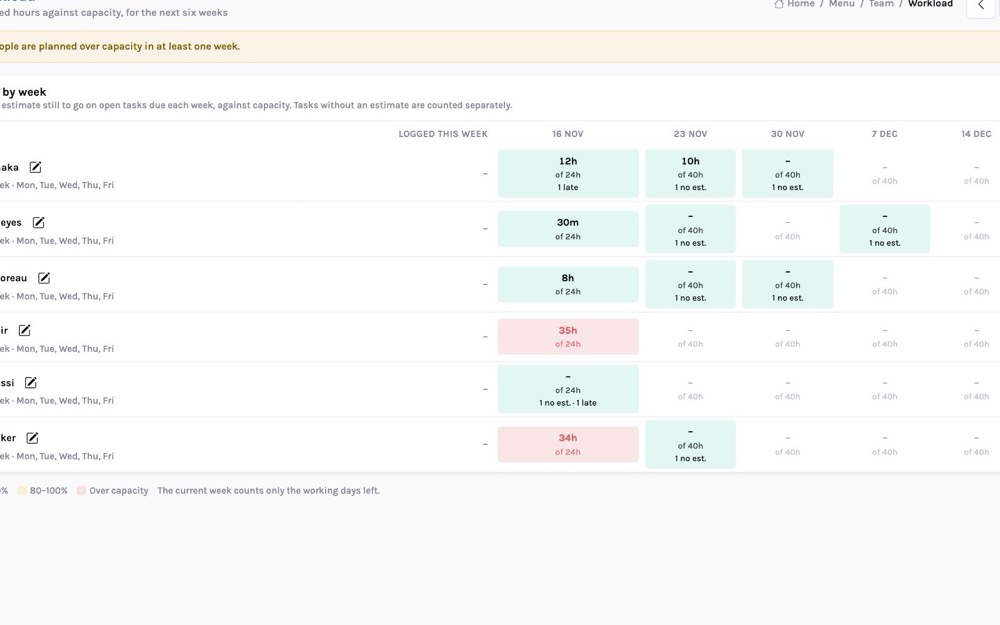
The Workload page has one row per person and one column per week for the next six weeks. A cell is the estimate still to go on that person’s open tasks due that week, against their capacity for the week. Capacity is 40 hours a week by default; a manager can change a person’s hours and working days. The current week counts only the working days left, which is why this Wednesday shows 24 hours rather than 40.
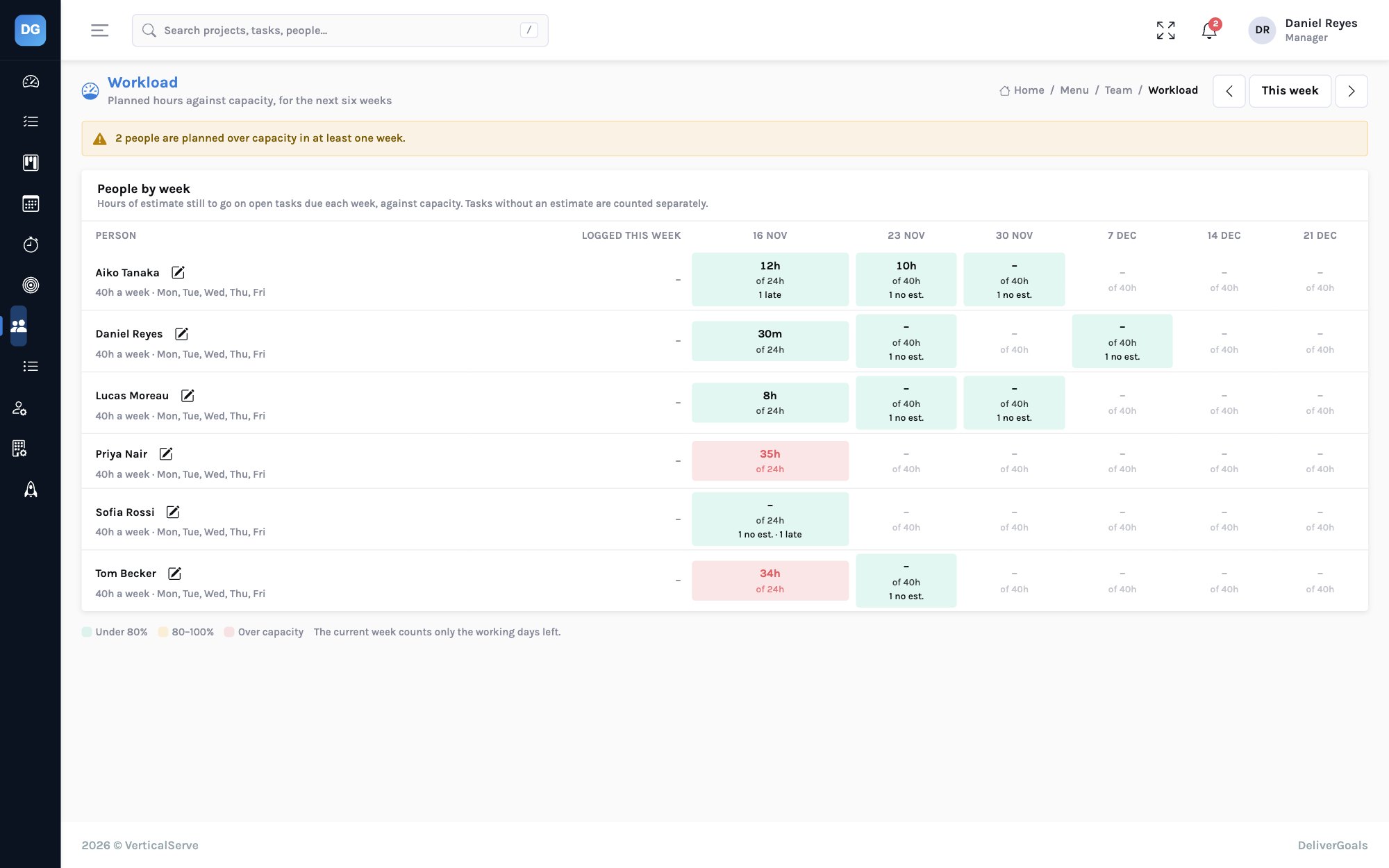
Overdue work lands in the first week, because it still has to be done. Tasks with no estimate are counted separately (“1 no est.”), so a cell that looks light is not mistaken for spare capacity. Click a cell to see the tasks behind it and reassign one from there.
| Cell colour | Means | What to do |
|---|---|---|
| Green | Under 80% of capacity | Room for new work |
| Amber | 80–100% | Full; take on nothing new without moving something |
| Red | Over capacity | Move a task, move a date, or cut scope before promising anything |
3. Rebalancing
Daniel opens Priya’s red cell. Of her 35 hours, “Checkout flow redesign” is 20. Tom is red too, so moving it to him helps nobody. Aiko is at 12 of 24. He reassigns “Migrate blog to the new CMS” (15h) from Priya to Aiko, and Priya drops to 20h. A one-week-early pricing page still needs Lucas’s copy task; Lucas has 8 of 24 hours planned, so that part is safe.
4. The portfolio: which projects are at risk, and why
The Portfolio page puts every project you can see on one roadmap, as a bar from its start to its end date (or its tasks’ first and last dates), filled to its progress, with milestones as diamonds and a line for today. Each project says whether it is on track or at risk, and gives the reason.
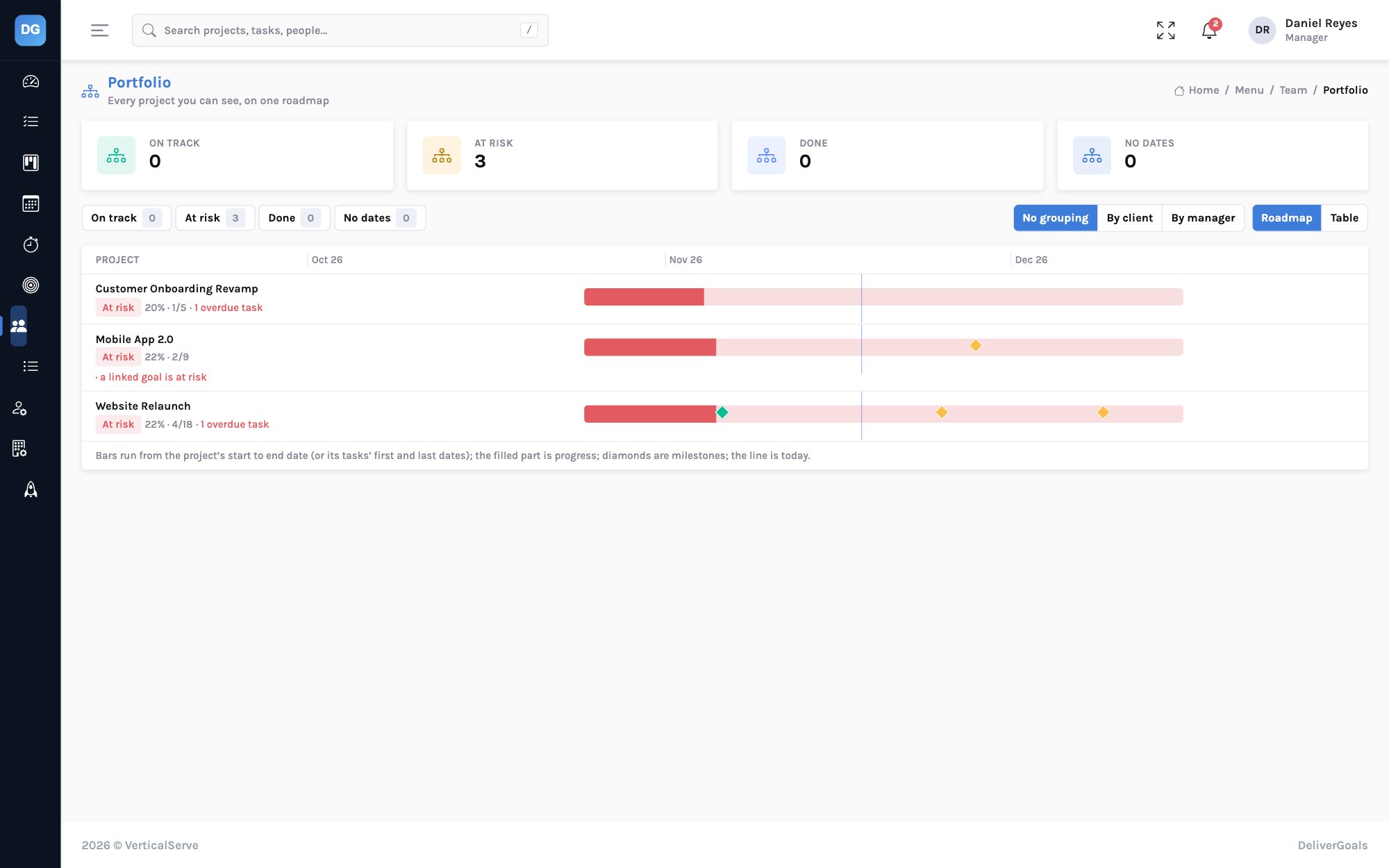
The reasons are counted, not guessed: open work past its due date, or a linked goal that is at risk or forecast to be late at its current pace (see goals that measure themselves). Group the roadmap by client or by manager, filter by status, or switch to a table and export it.
5. Dependencies on the timeline
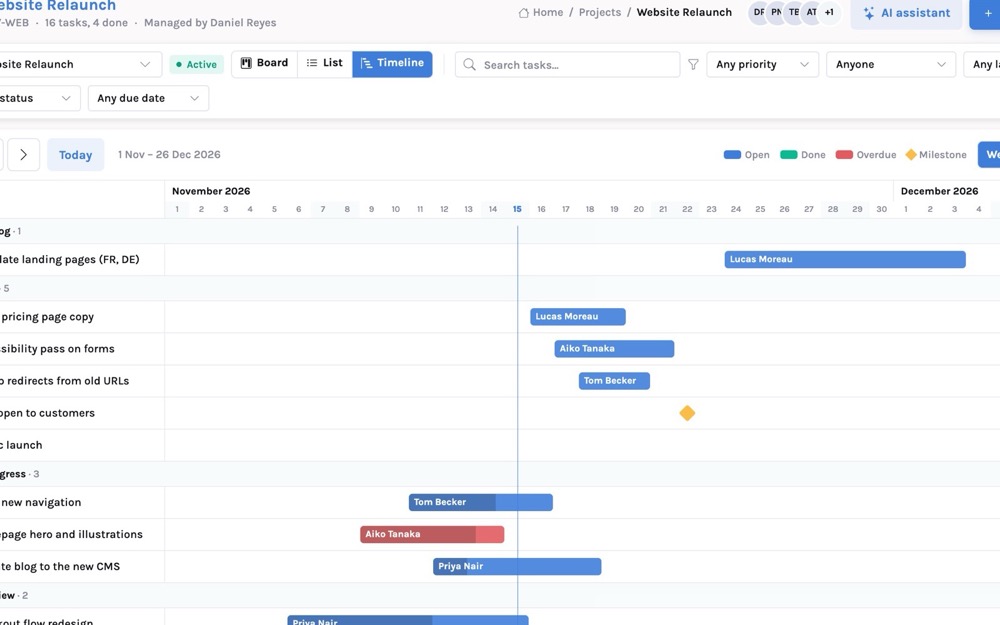
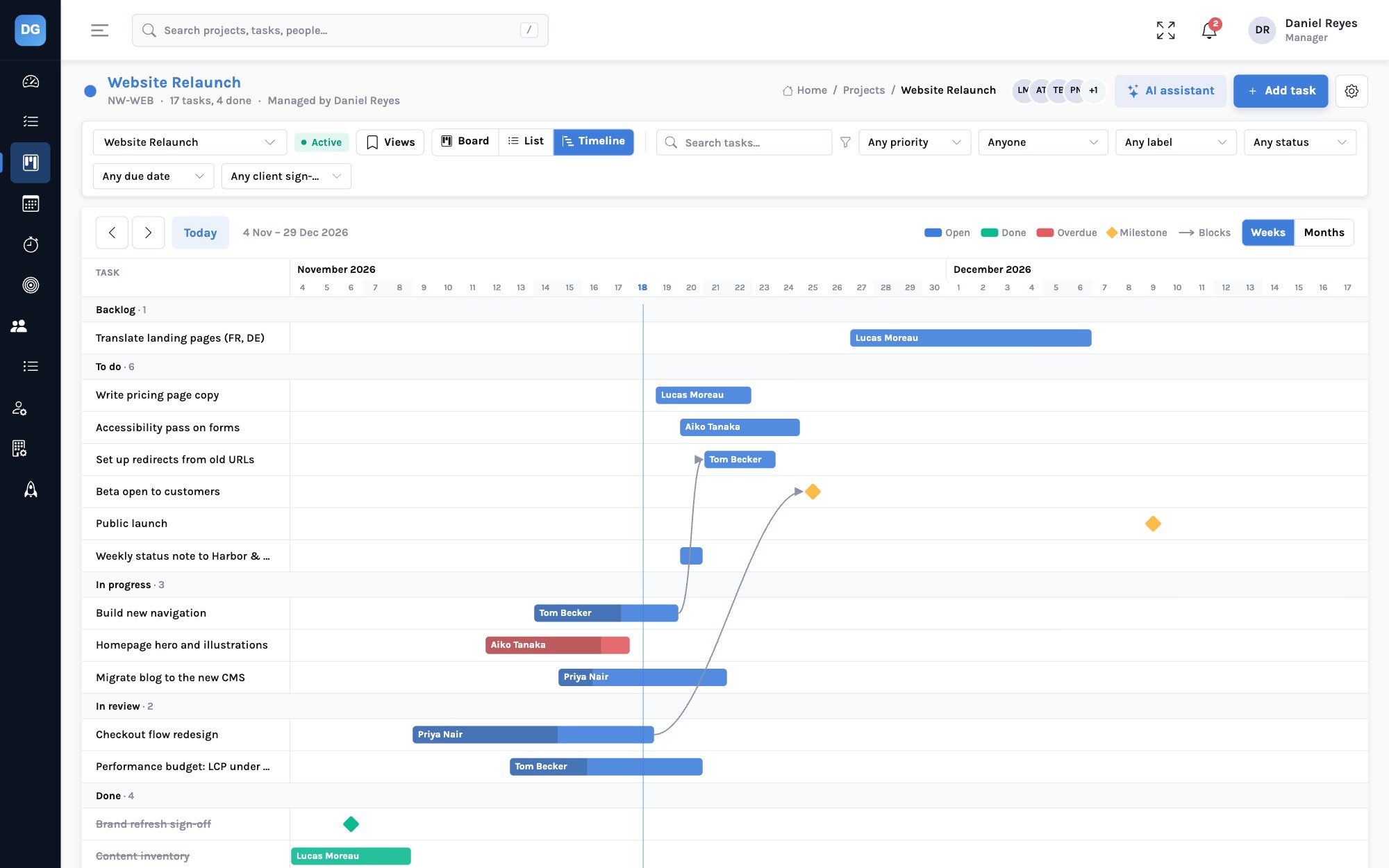
A date can be safe in hours and still slip because of order. The project timeline now draws an arrow from the end of each blocking task to the start of the task it holds up. An arrow is drawn red and dashed when the blocked task is planned to start before its blocker is due.
| Question | Screen |
|---|---|
| How much is left on this task? | The task’s estimate and logged time |
| Who has room next week? | Workload |
| Who is over capacity right now? | Workload, red cells, and its banner |
| Which projects are at risk, and why? | Portfolio |
| What has to finish before the beta? | Timeline arrows |
| Did the plan hold? | Time report: estimates beside actuals by task |
Where it stops
Capacity is planned from estimates: tasks without one are counted but not weighed, and an estimate is only as good as the person who made it. Workload covers the projects you manage (admins: the company) and the next six weeks. There are no sprints, no resource levelling and no automatic rescheduling; nothing moves a date by itself. The portfolio reads project dates and task ranges; it does not model budgets.
The routine takes ten minutes before any new commitment: Workload, then Portfolio, then the timeline. For the daily view of what is stuck, see the manager’s daily brief; for hours actually spent, time tracking without timesheets.