A website relaunch is a small project that behaves like a large one. Design, content and engineering all have work in it, some of that work cannot start until other work is finished, and the client wants to know two things: when can we see it, and when does it go live. It is tempting to give each discipline its own board. This post argues for one board, and shows what that looks like.
The example is Website Relaunch, a project in Northwind Studio, the demo workspace that we use for screenshots. Northwind Studio, its client Harbor & Finch and the people named below are fictional. The screens are DeliverGoals as it runs today.
Start with the project, not the tasks
In DeliverGoals a project is either client work or internal work. Website Relaunch is a client project: it has a code (NW-WEB), a colour, a manager (Daniel Reyes), and five members. People see the projects they are members of, so the first decision is who is on it.
| Project setting | Website Relaunch | Why it matters |
|---|---|---|
| Type and client | Client project for Harbor & Finch | Keeps client work apart from internal projects on the Projects page |
| Code | NW-WEB | A short name people can say in a stand-up |
| Manager | Daniel Reyes | Gets a notification when a task in the project is completed |
| Members | Daniel, Priya, Tom, Aiko, Lucas | Project membership decides who sees the board |
| Status | Active | Later: on hold, completed or cancelled |
Five columns are enough
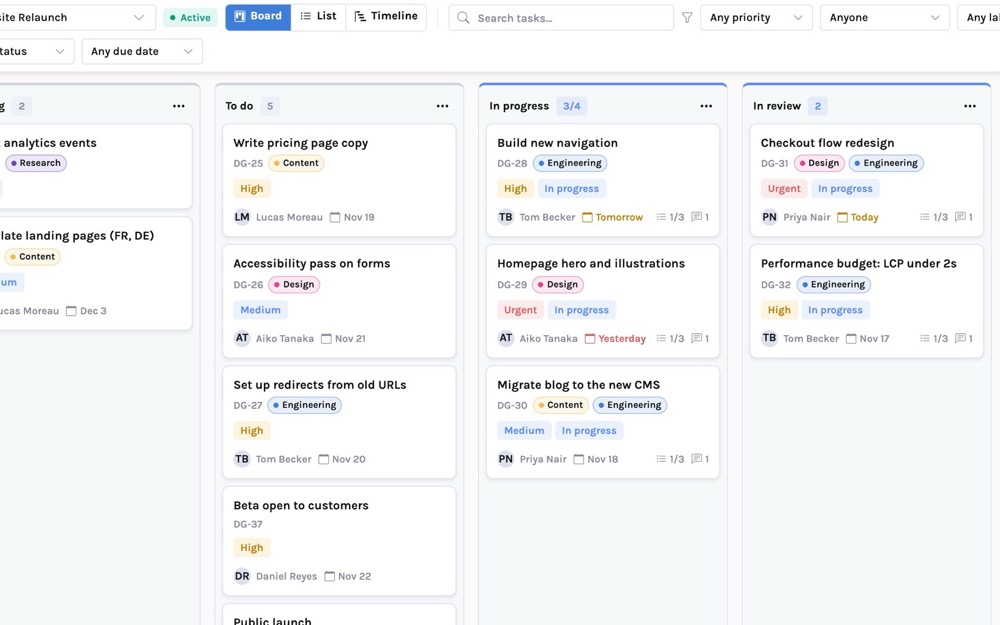
Columns, which DeliverGoals also calls sections, describe the state of a task, not the kind of work. The relaunch uses five: Backlog, To do, In progress, In review and Done. Resist adding a column per discipline. A “Design” column tells you who is working on a card but not whether it is finished, and the card has to leave that column the moment engineering picks it up.
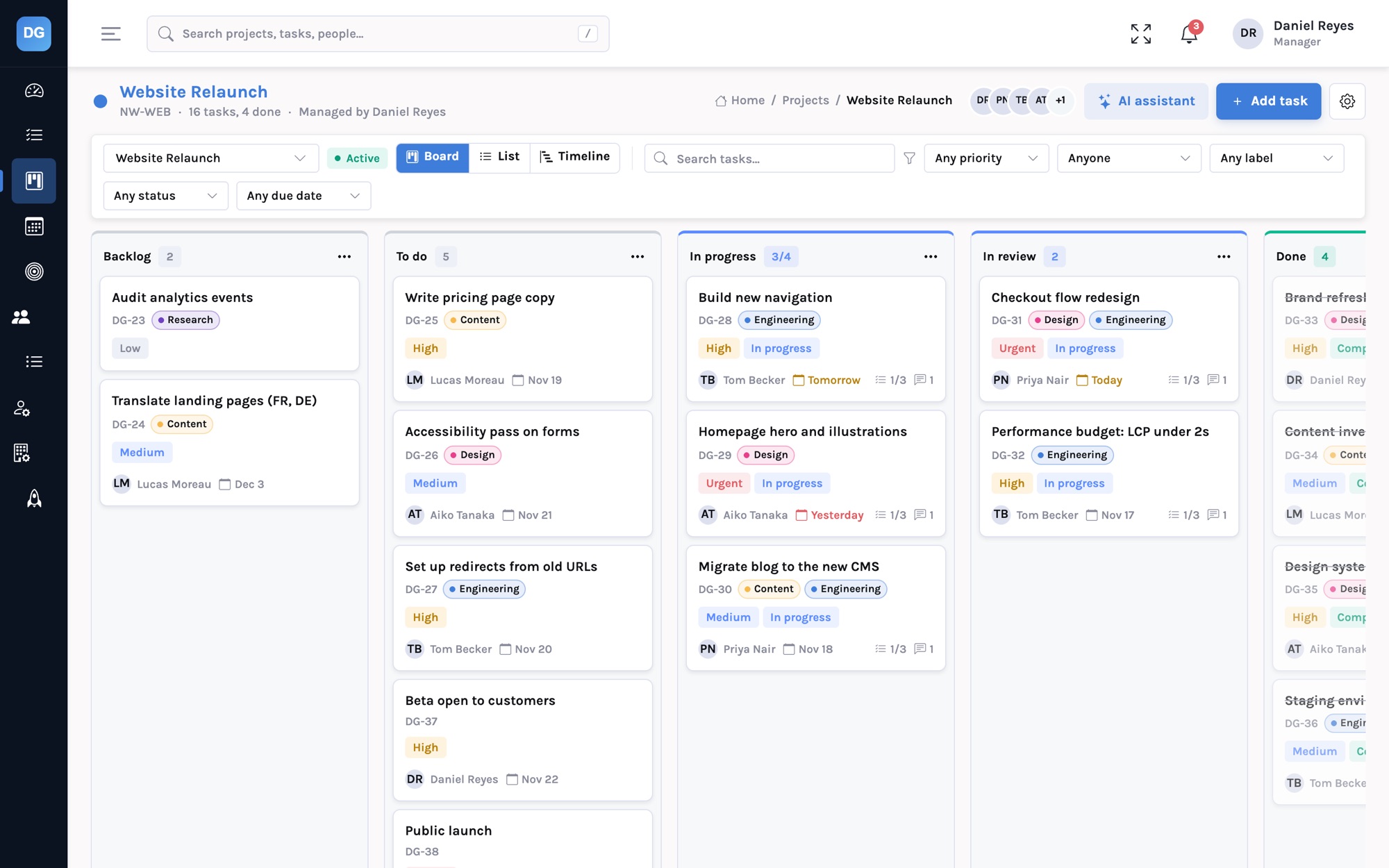
New cards go in with quick add: type a title in the column and the card is there. During the kickoff call Daniel added the sixteen tasks that way, titles only, and filled in the rest afterwards.
Labels say what kind of work it is
The kind of work goes on a label instead of a column. The relaunch has four labels: Design, Content, Engineering and Research. A card can carry more than one. “Migrate blog to the new CMS” is both Content and Engineering, because Lucas has to tidy the posts and Tom has to move them. “Checkout flow redesign” is Design and Engineering.
The filter bar above the board has a label filter. Choose Design and the board shows only design cards, still in their columns, so the designer sees her work in the context of the whole flow rather than on a separate board.
What goes on each card
A card shows what somebody scanning the board needs, and nothing more:
- Assignee. One person. If two people share a task, split it or use subtasks.
- Priority. Low, medium, high or urgent. The relaunch has three urgent tasks; if everything is urgent the field is useless.
- Due date. Shown as Today, Tomorrow or Yesterday when it is close, and in red once it has passed.
- Subtask and comment counts. “1/3” means one of three subtasks is ticked.
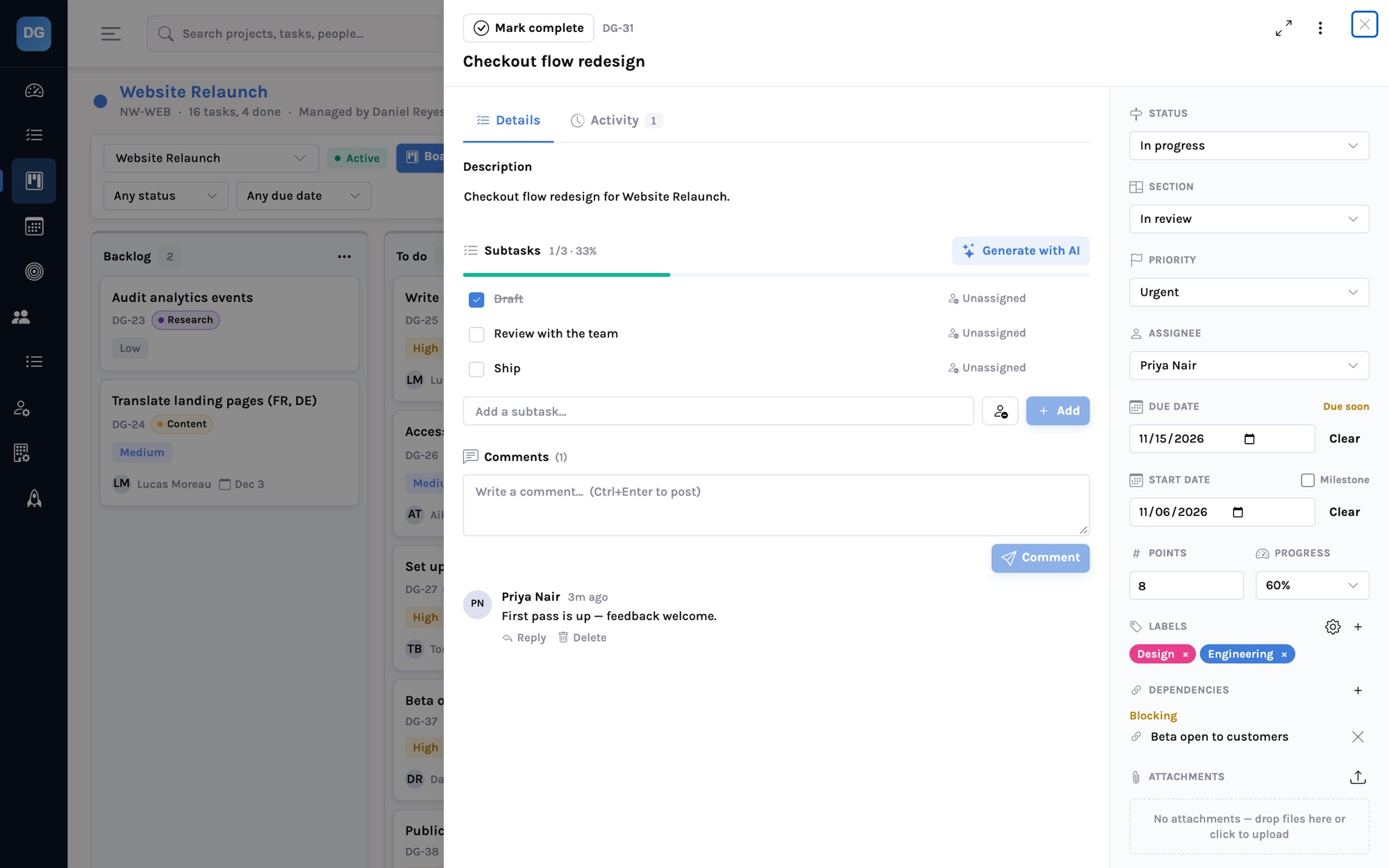
Everything else lives inside the task. Open “Checkout flow redesign” and the side panel shows its description, three subtasks (Draft, Review with the team, Ship), a comment from Priya, its start and due dates, eight story points, 60% progress, both labels and its dependencies.
Dependencies: write down what blocks what
The client’s first date is the beta. The beta cannot open until the checkout flow is redesigned, so the checkout task is marked as blocking “Beta open to customers”. From the other side, the beta task shows that it is blocked by the checkout task.
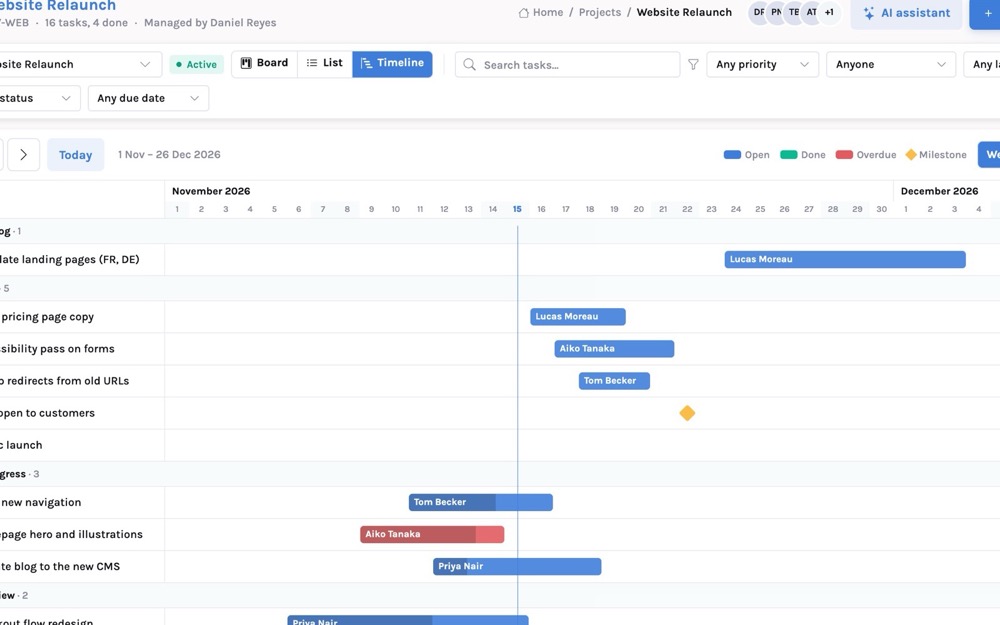
This is worth doing for the handful of tasks where order really matters. It answers the question “what is this waiting on?” without a meeting. Dependencies are listed on the task; they are not drawn as arrows on the timeline, so keep them few and meaningful.
Use the list for housekeeping
The board is good for seeing flow. It is slow for changing ten things at once. The List tab shows the same tasks as rows grouped by column, with status, priority, assignee and due date as fields you change in place.
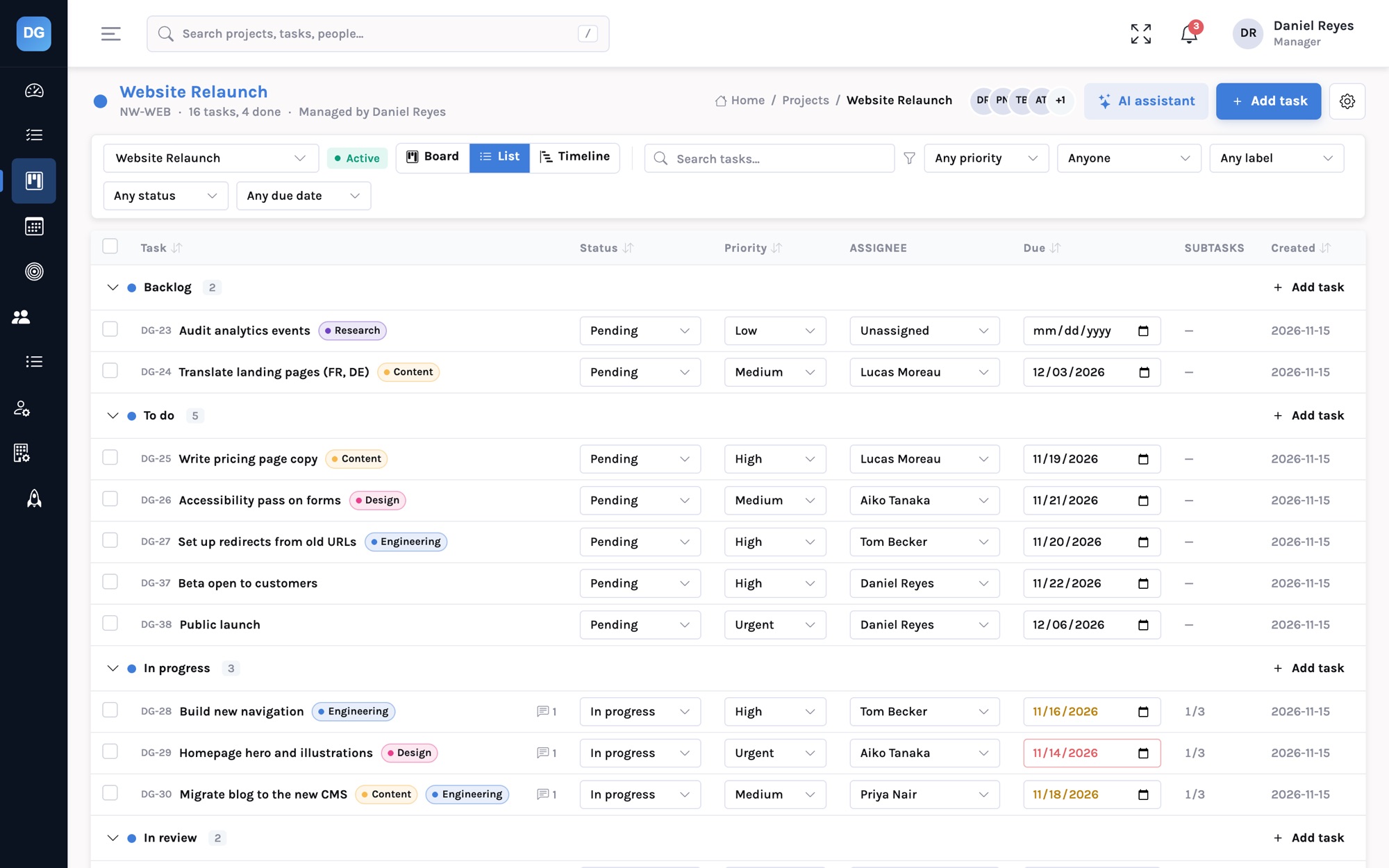
After the weekly client call, this is where Daniel works:
- He ticks the checkboxes on the tasks the client pushed back and updates them together with a bulk action.
- He changes two assignees straight from the drop-down in the row.
- He exports the list when the client asks for the task list in an email.
A weekly rhythm for the board
| When | Who | What they do on the board |
|---|---|---|
| Every day | Each member | Drag their cards as work moves; tick subtasks; comment on the task instead of in chat |
| Every day | Daniel | Look at In review and at anything with a red date |
| After the client call | Daniel | Use the list to re-prioritise and re-date in bulk |
| Friday | Everyone | Empty In review: either it moves to Done or it goes back with a comment |
What the board will not do for you
In this walk-through the cards are moved by hand. The project can also switch on automation recipes, for example moving a card when its last subtask is ticked, and repeat the weekly client note as a recurring task; see automating the busywork. In a team of five, moving the card yourself is still a good way to say it is done.
Why one board
With one board, the client’s two questions have one place to be answered. “When can we see it?” is the beta card and what blocks it. “When does it go live?” is the launch card. Everyone on the project sees the same columns, and the labels let each discipline filter down to its own work when it wants to.
The next post takes the same project and looks at it by date instead of by column: from due dates to a plan. For the full list of what a board and a task hold, see Boards, lists & tasks.